
How To Use/Add Blogger Label/tag and Categories
Blogger has made categorizing posts pretty simple, however it’s something that is often overlooked or misused. Categorizing your posts helps organised your blog letting your readers find what they are looking for. On Blogger, categories are called labels. Whenever you create a post, in the post editor on the right, you have the option of adding labels or tags to that post.
The major use of label is to build your post related field either in categories or tag.
Below is an example of label and category.
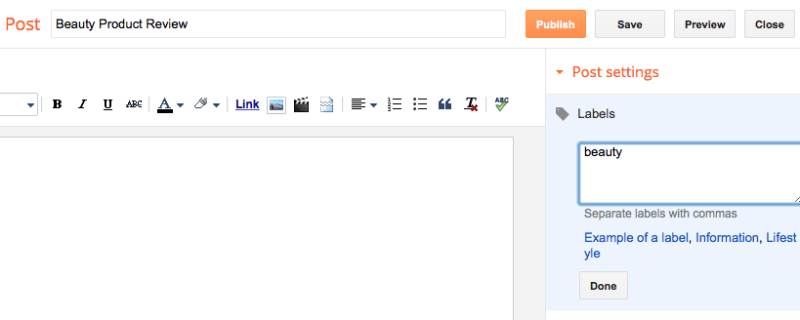
Existing labels will appear below the label box so you can quickly add them. On your blog, labels appear in the post meta in the post header or post footer area, this is usually below your post title or under your content. They are linked to a search label page in Blogger. If you click on one of these categorized links, you will be directed to a search page on your blog that shows all the posts with that particular label attached. If you labeled your post “beauty”, then the URL will look like this – http://your-blog-name.blogspot.com/search/label/beauty. Notice that the labels are both written in lowercase, labels are case-sensitive so it’s important they match.

HOW TO USE LABELS PROPERLY
The common misconception is that labels/categories/tags have SEO value – that adding keywords to the labels will help their blog get noticed. As mentioned in my SEO myths post, Labels do not impact SEO at all. They are purely to organise your content and help readers find posts so really think about the labels you use. Before I started this blog I thought up six main topics I’d be covering and set them up as categories, this separates my content to help readers find posts.
USING LABELS IN NAVIGATION
It’s a really good idea to add labels to your navigation menu as your topics or categories. You can click on one of your post labels at the bottom of your published post and then copy the link or if you know how your label is spelled you can manually type it out using this format http://your-blog-name.blogspot.com/search/label/yourlabel or http://your-blog-name.blogspot.com/search/label/your%20label if spaces are used (eg “your label” instead of “yourlabel”). Remember that the label in the URL needs to be spelled exactly the same way as you have typed it into the labels section of you post and is case sensitive.
You can use the pages gadget in Layout to create a navigation bar, using an external link to add your labels. I also have a load of tutorial on custom navigation menus here.
Comments
Post a Comment